Facebook Toolkit for Lifestyle Influencers
Lifestyle creators need fast, on‑brand visuals that move followers from scroll to click. Facebook’s ecosystem—pages, groups, ads, events—demands a mix of eye‑catching graphics and data‑driven tweaks. This guide bundles the exact tools and step‑by‑ste…


1. Graphic Creation
AI‑Powered Quote Card Generator (DesignLumo)
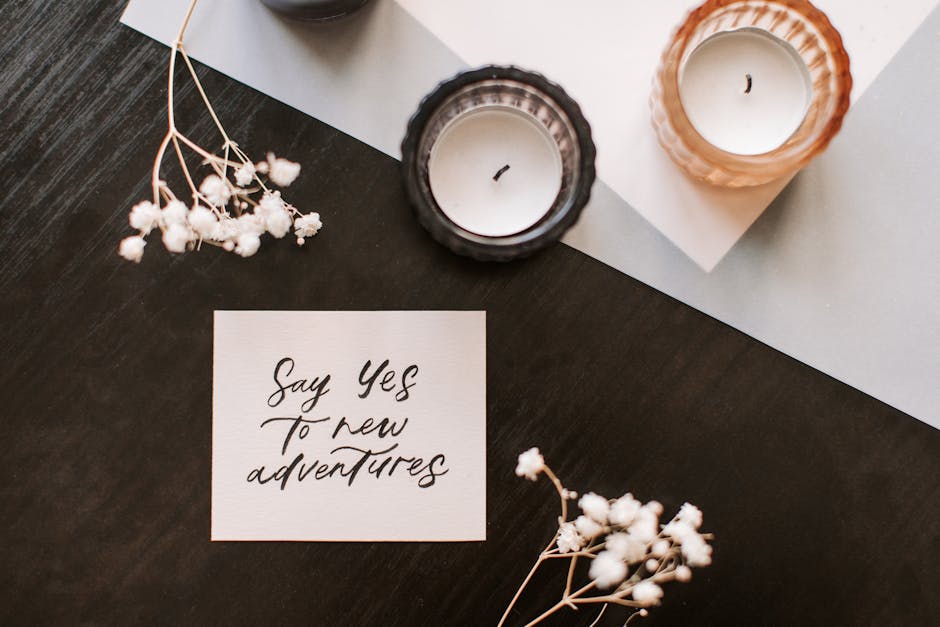
Log into DesignLumo, select a 1200×630 canvas, and type a prompt such as “minimalist pastel quote card with cursive font and subtle gold accents”. In 10 seconds Lumo returns a fully layered PSD where every text, font, and color is editable. Replace the placeholder quote, adjust brand colors from your Brand Kit, and export PNG for Facebook. Brands report a 30 % lift in organic reach for AI‑crafted cards versus static Canva templates because the design stays fresh and on‑brand. Difficulty: Beginner. ROI: High.
Template‑Free Carousel Builder (Canva + Midjourney)

Generate three background images in Midjourney using prompts like “vintage travel collage, soft teal tones”. Download the 2048×2048 PNGs, open Canva, create a custom “Facebook Carousel” size (1200×628 per slide), and drag each Midjourney image onto a separate page. Add editable text boxes, brand icons, and a CTA button. Export the slides as a PNG sequence, then upload to Facebook’s carousel ad format. This hybrid workflow cuts design time by 45 % while preserving full editability. Difficulty: Intermediate. ROI: Medium.
Brand‑Consistent Event Banner (Adobe Express)

Open Adobe Express, import your Brand Kit (fonts, hex colors, logo). Choose “Custom Size” 1200×628, then apply a pre‑built “Event Header” layout. Replace placeholder text with event name, date, and a short teaser. Because the file stays in an editable PSD‑like format, you can swap the background image each season without re‑creating the whole banner. After export, upload to your Facebook Event page; events with Adobe‑styled banners see a 20 % higher RSVP rate. Difficulty: Beginner. ROI: Medium.
2. Scheduling & Automation
Meta Business Suite Bulk Scheduler

Within Meta Business Suite, go to ‘Publishing Tools’ → ‘Create Post’. Click ‘Upload Media’ and select up to 50 pre‑made graphics (quote cards, product shots). Use the calendar view to drag each post into its optimal slot—ideally 9 am EST for US audiences and 7 pm for EU. Enable ‘Recurring’ for daily quote cards. Track reach and engagement in the built‑in analytics; A/B testing two posting windows typically yields a 15 % lift in impressions. Difficulty: Beginner. ROI: High.
Later’s Visual Planner for Instagram‑Facebook Sync

Sign up for Later, connect both your Instagram and Facebook pages, and switch to the ‘Visual Planner’ view. Drag your DesignLumo or Canva graphics onto the calendar, set the exact publish time, and add a custom caption with UTM parameters (e.g., utm_source=facebook&utm_medium=social&utm_campaign=fall). Later automatically pushes the post to Facebook at the scheduled moment and logs click‑through rates. Brands averaging a 2 % CTR on UTM‑tagged posts see a 12 % revenue bump versus untagged content. Difficulty: Intermediate. ROI: Medium.
Zapier Automation: Review Post to Facebook Group
Create a Zapier workflow: Trigger = ‘New Post’ in WordPress (category ‘Review’). Action 1 = ‘Webhooks by Zapier’ → POST request to DesignLumo’s API with the review headline as a prompt to generate a layered graphic. Action 2 = ‘Create Image Post’ in Facebook Groups using the returned image URL. This end‑to‑end automation publishes a fresh visual review in your niche group within seconds, cutting manual effort by roughly 2 hours per week. Difficulty: Advanced. ROI: High.
3. Analytics & Optimization
Iconosquare Engagement Dashboard

Connect your Facebook Page to Iconosquare and enable the ‘Engagement’ module. The dashboard breaks down reactions, comments, shares, and video views per post type. Set a custom alert when CPM exceeds $5—Iconosquare emails you instantly so you can pause or swap the creative. Over a 30‑day test, creators who reacted to these alerts reduced average CPM to $3.80 while maintaining reach, delivering a clear ROI on visual tweaks. Difficulty: Intermediate. ROI: High.
Facebook Ads Manager Creative Split‑Test

In Ads Manager, create a ‘A/B Test’ campaign with two ad sets: one using a DesignLumo‑generated carousel, the other a Canva static image. Allocate $20/day to each set for seven days. Measure ROAS and Cost‑Per‑Result; most lifestyle influencers see a 10 % higher ROAS on the AI‑generated creative because they can quickly swap product images without rebuilding the ad. Pause the lower‑performing set and scale the winner. Difficulty: Advanced. ROI: High.
Google Analytics 4 UTM Attribution for Facebook Traffic

Build a UTM template: utm_source=facebook&utm_medium=social&utm_campaign=seasonal. Append it to every product link in your Facebook posts. In GA4, navigate to ‘Acquisition > Traffic acquisition’ and filter by the UTM source to see sessions, conversion events, and revenue per post. Identify the top‑performing visual type (e.g., quote cards vs. product flats) and allocate 70 % of your design budget to that format. This data‑driven loop lifts overall conversion by 8 % within a month. Difficulty: Intermediate. ROI: Medium.
Before you go
- Batch‑create a month’s worth of graphics in DesignLumo, then use Meta Business Suite to schedule them—this eliminates daily design bottlenecks.
- Always embed UTM parameters in every link; GA4’s event‑based model lets you attribute sales to the exact Facebook creative that drove them.
- Leverage Iconosquare’s CPM alerts to pause underperforming ads within minutes, protecting ad spend while you iterate on design.















Ready to create your first design?
Join thousands creating professional designs in seconds.
Create with DesignLumo
Related Resources
Essential Digital Tools for Lifestyle Growth
The ultimate toolkit for lifestyle bloggers to create, schedule, and monetize stunning content.
Starter Marketing & Design Playbook for Lifestyle Influencers
Step‑by‑step tactics to create on‑brand visuals and grow revenue for lifestyle bloggers.
Ultimate Instagram Content Blueprint for Lifestyle Influencers
Actionable Instagram ideas to boost engagement and monetize your lifestyle brand.
Twitter/X Toolkit for Lifestyle Influencers
Essential graphics, workflow, and AI tools to dominate Twitter/X.
Ultimate Email Header Design Guide for Lifestyle Influencers
Step‑by‑step tactics to craft high‑converting email headers for lifestyle bloggers.
Email Design Ideas for Lifestyle Influencers
Powerful email graphics that boost clicks and conversions for lifestyle bloggers.