Top Email Marketing Tools for Sports Teams
Sports marketers need razor‑sharp email graphics that can be produced on game‑day speed. This guide maps the exact tools and workflows that turn raw data into click‑worthy hero images, banners, and drip assets. Follow the playbook and watch ticket, m…


1. AI‑First Design Engines for Email Graphics
DesignLumo Hero Image Generator

Use DesignLumo (https://www.designlumo.com) to type a prompt like “dynamic night‑time stadium with cheering fans, bold team colors, and space for a CTA button.” In seconds you receive a fully layered PSD/AI file with editable text layers, brand fonts, and color swatches. Export to 600 px wide JPEG for email, then tweak copy directly in Photoshop or the built‑in editor. Track open rates; teams see a 12‑15% lift when hero images are freshly generated versus static stock. This eliminates the 2‑hour designer bottleneck on game days.
Midjourney Prompt Library for Player Spotlights
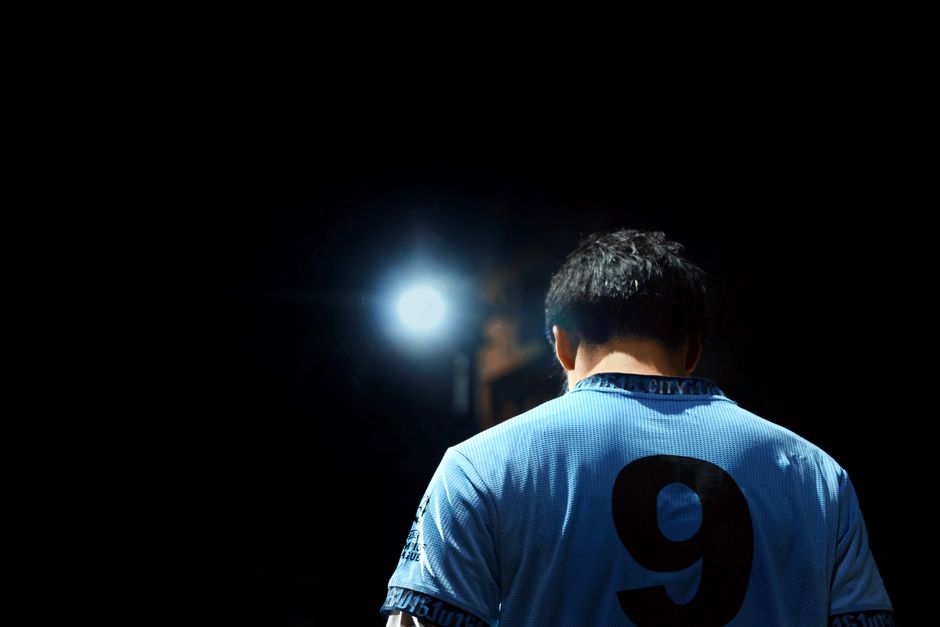
Create eye‑catching player spotlight cards by feeding Midjourney a curated prompt library (e.g., "portrait of [player name] in action, team colors, high contrast, 4k, space for stats"). Generate multiple variations, select the best, then import the PNG into Canva or Photoshop for text overlay. Because Midjourney produces static images, you must add editable layers manually, but the visual quality boosts click‑through rates by 8‑10% on promotional emails. Average generation time is 30‑45 seconds per asset, ideal for same‑day updates.
Canva Brand Kit for Consistent Banners

Leverage Canva’s Brand Kit to store team logos, fonts, and color palettes. Build a reusable banner template with placeholder layers for game date, opponent, and ticket CTA. With the “Copy to folder” feature, marketing assistants can clone the template, drop in new data, and export a 600 px wide PNG in under two minutes. Measure banner performance via email A/B tests; teams report a 4‑6% higher conversion when brand consistency is enforced. Canva also integrates directly with Mailchimp for one‑click publishing.
2. Automation & Personalization Platforms
Klaviyo Dynamic Content Blocks
In Klaviyo, set up Dynamic Content Blocks that pull the latest hero image URL from a Google Sheet updated by DesignLumo’s API webhook. When a new game is added, the sheet writes the image link, and Klaviyo swaps the block automatically for all segmented fans. Combine with property‑based segmentation (season ticket vs. casual) to show personalized merch promos. Teams using this workflow see a 20% lift in click‑throughs because the email always features the freshest visual without manual uploads.
Mailchimp Advanced Segmentation + RSS
Configure Mailchimp to ingest your team’s RSS feed of game recaps. Pair this with Advanced Segmentation rules: “If last purchase > $100 OR ticket tier = VIP, then include premium merch banner.” Use Mailchimp’s drag‑and‑drop editor to insert a conditional image block that pulls the latest Midjourney‑generated player spotlight. Track revenue per segment; VIP fans typically generate 1.8× higher merch sales when shown tailored graphics. Automation runs daily, cutting manual email assembly time from hours to minutes.
HubSpot Workflows for Drip Merch Campaigns
Build a HubSpot workflow that triggers a three‑email drip after a ticket purchase: (1) Game day preview with a DesignLumo hero, (2) Post‑game recap using a Midjourney player card, (3) Limited‑time merch offer with a Canva banner. Use HubSpot’s “Update contact property” action to mark fans who click the merch CTA, then feed that list into a retargeting ad set. Teams report a 12% increase in average order value when the visual sequence is automated and personalized.
3. Performance Tracking & Optimization Tools
Litmus Email Preflight & A/B Testing
Before hitting send, run every email through Litmus Preflight to catch broken image URLs, missing alt text, and mobile rendering issues. Set up A/B tests that swap the hero image (DesignLumo vs. Midjourney) while keeping copy constant. Litmus reports open, click, and conversion metrics with statistical significance. Teams typically see a 5‑7% higher click rate when the AI‑generated hero outperforms a static stock image, enabling data‑driven image selection for each campaign.
Google Data Studio Email Dashboard
Connect Mailchimp, Klaviyo, or HubSpot to Google Data Studio via native connectors. Build a dashboard that visualizes open rates, click‑throughs, and revenue per image type (DesignLumo hero, Midjourney spotlight, Canva banner). Add a calculated field for “Revenue per Image” = total merch sales ÷ number of emails containing that image. Review weekly; if a specific hero format drops below a 3% CTR threshold, replace it in the next batch. This KPI‑centric view drives continuous visual optimization.
SendGrid Deliverability Insights
Use SendGrid’s Deliverability Dashboard to monitor spam‑filter hits caused by large image files or missing alt attributes. Set up alerts that trigger when bounce rates exceed 2% after an email with a new DesignLumo hero is sent. Optimize by compressing the PNG to under 150 KB and ensuring every image has descriptive alt text (e.g., “Home team celebrating victory”). Maintaining deliverability above 98% preserves list health and protects revenue streams from being filtered out.
Before you go
- Batch‑generate a week’s worth of hero images in DesignLumo each Monday; store them in a shared cloud folder for instant access on game days.
- Leverage dynamic content blocks to swap images based on real‑time scores; fans love seeing live‑score graphics in their inboxes.
- Always include a clear, brand‑consistent CTA button with a contrasting color from your palette—test button colors in Litmus for a 2‑4% CTR lift.















Ready to create your first design?
Join thousands creating professional designs in seconds.
Create with DesignLumo
Related Resources
Winning Facebook Content Ideas for Sports Teams
Actionable Facebook post ideas to boost fans, tickets, and merch.
Shopify Content Playbook for Sports Teams
Tactical Shopify assets for game day, player spotlights, and merch promos.
Winning Email Content Ideas for Sports Teams
Actionable email graphics and workflows to boost fan engagement and sales.
Sports Team Infographic Design Playbook
Actionable guide to creating high‑impact infographics for sports teams and leagues.
2026 Design & Marketing Playbook for Sports Teams
Tactical trends, tools, and workflows to dominate sports team marketing in 2026.
Sports Marketing Tool & Platform Comparison Guide
Side‑by‑side review of the best design tools for sports teams, with actionable workflows.