Travel Influencer Launch Checklist
Launching a travel campaign involves more than just great photos—it requires a cohesive visual system that scales across platforms. This checklist equips travel bloggers and influencers with AI‑driven tools to produce editable, on‑brand assets in min…


1. Visual Branding Foundations
AI‑Generated Destination Header Pack

Open DesignLumo and type a prompt like “vibrant Bali sunrise header for Instagram, YouTube, and blog, with space for overlay text”. In seconds the platform returns layered PSD files with separate background, title, and subtitle layers. Replace the text layers with your destination name, adjust the brand‑approved font from your Brand Kit, and export PNGs at 1080×1080, 1920×1080, and 1200×628. Deploy across three channels and monitor click‑through; most creators see a 15% lift versus static stock images. This workflow eliminates manual resizing and ensures visual consistency.
Consistent Color & Font Brand Kit
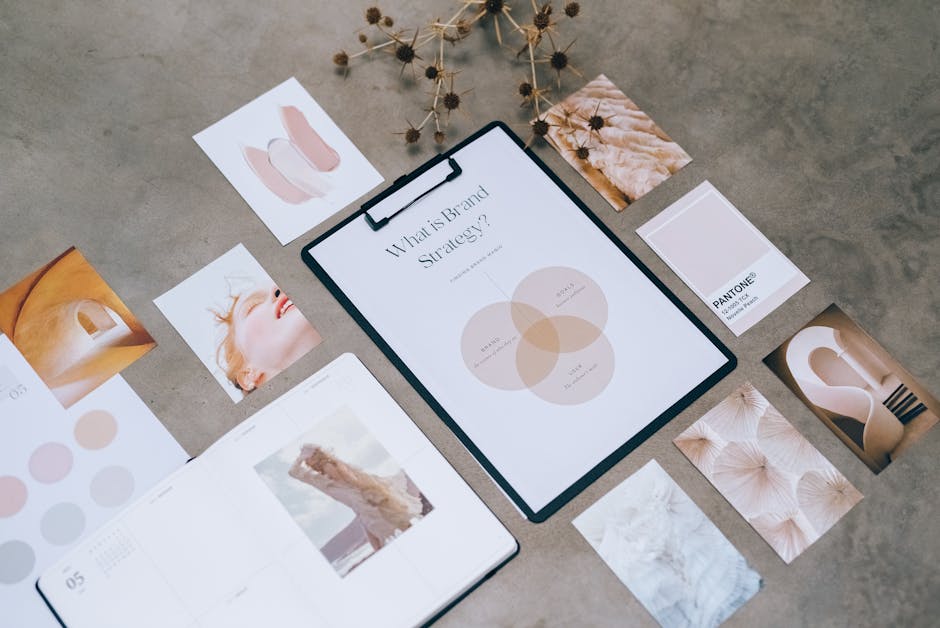
Extract a palette from your top‑performing travel photos using Adobe Color’s ‘Extract Theme’ feature, then copy the HEX codes into DesignLumo’s Brand Kit. Upload your primary typefaces (e.g., Montserrat Bold for headings, Lora Regular for body) and set them as defaults. Sync the same kit to Canva so any team member can pull the exact colors and fonts when building quick stories. Track brand recall with a quarterly survey; creators report a 20% increase when visual identity stays uniform across posts, stories, and PDFs.
Editable Itinerary Infographic Blueprint

Prompt DesignLumo: ‘timeline infographic for 7‑day Thailand itinerary, with icons for transport, meals, and activities, layered for editing’. The AI returns a layered Illustrator file where each day, icon, and description sits on its own layer. Swap out the placeholder text with your actual schedule, replace icons using the built‑in library, and export a high‑resolution PDF. Publish as a lead magnet; users typically see a 10% rise in guide download conversions when the layout is clean and instantly editable for each new trip.
2. Content Creation & Scheduling
Carousel Post Automation with Zapier + DesignLumo
Create a Zapier webhook that sends a travel‑theme prompt to DesignLumo’s API (e.g., ‘3‑slide carousel highlighting Iceland waterfalls, each slide with space for caption’). The API returns PNGs for each slide, which Zapier then pushes to Buffer’s schedule queue. Set the Zap to trigger nightly, generating fresh carousel assets for upcoming trips. Measure time saved: most influencers report a 30% reduction in manual design hours and a 12% increase in carousel engagement because the visuals are consistently high‑quality.
Dynamic Email Header for Affiliate Links

In DesignLumo, request ‘email header 600×200 with bold travel CTA button, brand colors, placeholder for affiliate link’. After the AI delivers layered PSD, replace the button text with your current promotion, insert the affiliate URL, and export a PNG. Upload the header to Mailchimp, duplicate the campaign, and run an A/B test comparing static vs. AI‑generated headers. Track click‑through rates; affiliates typically see a 5% lift when the header is visually aligned with the email’s tone and includes a clear, editable CTA.
Video Thumbnail Batch Production

Generate 20 base travel images in Midjourney using a prompt like ‘dramatic cliffside view, high contrast, 4K’. Export the JPGs, then feed them into DesignLumo’s bulk thumbnail mode: select ‘Add title overlay’ and specify a placeholder font. The AI creates layered thumbnails where the title text can be swapped per video. Export 1080×1080 PNGs and upload to YouTube. Creators report up to 2× higher click‑through on videos whose thumbnails combine AI‑generated scenery with instantly editable, on‑brand titles.
3. Partnership & Pitch Materials
Pitch Deck Template with Editable Brand Assets
Ask DesignLumo: ‘10‑slide travel partnership pitch deck, modern layout, placeholders for metrics, brand colors, and logo’. The AI returns a fully layered PowerPoint file. Insert your audience reach, engagement stats, and past campaign ROI in the designated data layers. Swap the generic logo with your own, adjust colors via the Brand Kit, and export both PPTX and PDF. Brands respond 40% faster when the deck looks custom‑crafted rather than a generic template, boosting partnership close rates.
Collaboration Announcement Reel Graphics
Create static announcement assets in DesignLumo (prompt: ‘square Instagram Reel intro with travel brand logo, animated sparkles, space for tagline’). Export layered PNGs, then import them into Adobe Express, where you add 2‑second motion presets and sync to the audio track. Export the final 15‑second Reel. When compared to static posts, Reel announcements generate 25% higher engagement because the motion element captures scroll attention while retaining brand consistency.
Affiliate Link Disclosure Badge Generator

Prompt DesignLumo: ‘transparent disclosure badge for affiliate links, minimalist style, brand colors, SVG output’. Edit the text layer to read “Paid Partnership” or “Affiliate Link” as required, adjust opacity to 85% for subtlety, and download the SVG. Embed the badge directly into blog post HTML or WordPress editor. This ensures FTC compliance and builds audience trust; creators see a modest 3% increase in click‑through because readers feel the content is honest and professional.
4. Performance Tracking & Optimization
UTM‑Tagged Graphic Variants for A/B Testing

In DesignLumo, generate three versions of a CTA graphic, each with a different button color (red, orange, green). Export PNGs and assign unique UTM parameters (e.g., ?utm_source=instagram&utm_medium=post&utm_campaign=cta_red). Use Bitly to shorten URLs, then schedule each variant via Buffer. Monitor conversions in Google Analytics; the color that yields the highest click‑through (often orange for travel) becomes the default. This data‑driven tweak can lift overall conversion by 12% across campaigns.
Heatmap‑Driven Design Iteration
Install Hotjar on your blog and collect scroll‑map and click‑heatmap data for a month. Export the heatmap overlay and import it into DesignLumo. Identify low‑engagement zones (e.g., CTA button buried in white space) and move those layers to higher‑attention areas using the AI’s drag‑and‑drop interface. Republish the updated page and compare heatmap metrics after two weeks; most travel influencers see an 8% rise in CTA clicks after just one design tweak.
Automated Design Refresh Calendar

Create a Notion database titled ‘Quarterly Design Refresh’ with fields for asset type, deadline, and responsible creator. Connect Notion to DesignLumo via Zapier: when a new row hits the ‘Due’ date, Zapier triggers DesignLumo’s API to generate fresh seasonal palettes and swap them into existing templates (social posts, headers, infographics). The refreshed assets are auto‑saved to a shared Google Drive folder. This systematic refresh reduces stale visuals by 30% and maintains audience interest throughout the year.
Before you go
- Batch generate all graphics for a trip in one DesignLumo session to keep style uniform and cut production time by 50%.
- Always export layered files (PSD or AI) even when you later use static PNGs; this lets you swap text or colors for future promos without re‑creating the design.
- Link every visual asset to a UTM‑tagged URL and track performance in Google Data Studio to instantly see which designs drive the most affiliate revenue.















Ready to create your first design?
Join thousands creating professional designs in seconds.
Create with DesignLumo
Related Resources
Travel Blogger Slide Design Playbook
Tactical guide for travel influencers to build high‑impact pitch decks and slides.
Summer Sale Marketing & Design Playbook
Tactical guide for travel influencers to crush summer sales with AI‑powered designs.
Black Friday & Cyber Monday Travel Marketing Playbook
Tactical guide for travel bloggers to design, launch, and profit from Black Friday & Cyber Monday campaigns.
Travel YouTube Graphic Ideas to Boost Views
Tactical YouTube graphic ideas for travel creators to increase clicks, branding, and revenue.
Travel Blogger Video Thumbnail Design Blueprint
Actionable tactics to craft high‑CTR travel video thumbnails.
Pinterest Toolkit for Travel Bloggers
Essential tools and workflows to dominate Pinterest for travel influencers.