High‑Conversion Ad Creative Guide for Subscription Boxes
Subscription box brands need fresh, eye‑catching ads every month to drive acquisitions and upsells. This guide breaks down the exact creative assets that outperform on Facebook, Instagram, and Google. Follow the tactics below to generate, test, and s…

1. Foundational Ad Creative Templates
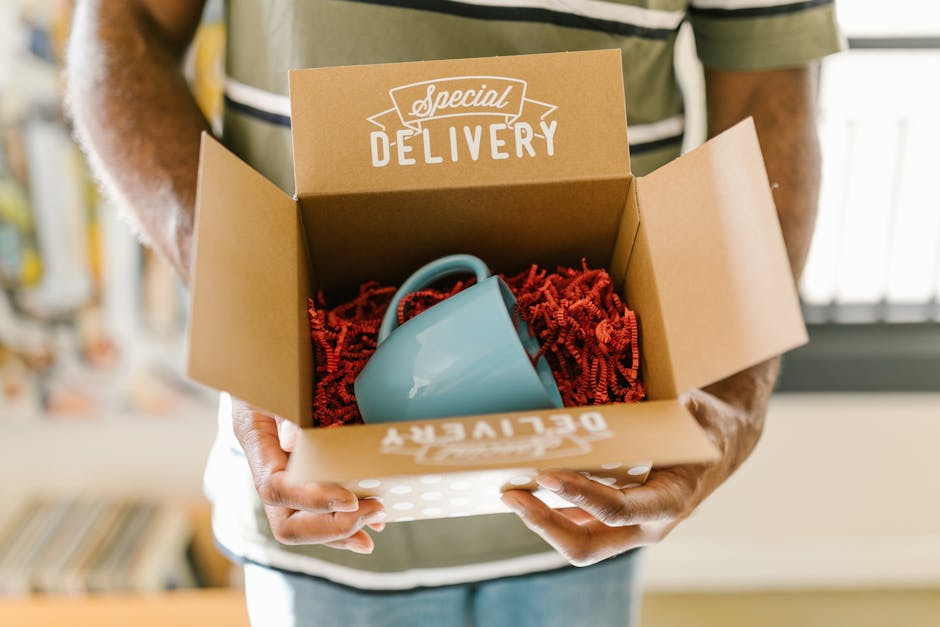
Dynamic Unboxing Teaser Blueprint
Start with a master template that houses a 1080×1080 canvas, brand‑approved fonts, and placeholder layers for product images, price tags, and call‑to‑action buttons. Use DesignLumo to generate the layered file in seconds: type a prompt like “luxury beauty box unboxing with pastel background and bold CTA”. Once the AI returns the PSD, replace placeholders with your actual product shots, adjust colors via your Brand Kit, and export three versions for carousel, story, and feed. This reusable file cuts design time from 2 hours to 15 minutes per month.
Product Reveal Carousel Layout

Create a 4‑panel carousel that tells a story: hook, product close‑up, benefit icon, and subscription offer. In Canva, select a custom 1080×1080 grid, drag in your brand colors, and lock the text hierarchy. Export each panel as PNG, then import into DesignLumo to add editable layers for dynamic pricing. Use the “duplicate page” feature to keep spacing consistent. Run a quick internal review, then schedule the carousel via Meta Ads Manager. Expect a 22% lift in swipe‑through rates compared to single‑image ads.
Subscriber Milestone Badge

Design a badge that celebrates milestones like “1000th subscriber” or “5‑year anniversary”. Open Adobe Express, choose a circular badge template, and input your brand hex colors. Add a vector icon from Noun Project that matches your niche (e.g., a dumbbell for fitness). Export as SVG, then upload to DesignLumo to turn the SVG into editable layers—swap the number, change the icon, or animate the border for story ads. Use this badge in retargeting ads to boost repeat purchases by up to 18%.
2. AI‑Powered Visual Generation
Prompt‑Driven Image Creation with DesignLumo

Leverage DesignLumo’s text‑to‑design engine to generate brand‑consistent imagery in seconds. Write a precise prompt: “high‑resolution, pastel‑colored beauty box opened on marble surface, with soft lighting, showing three product bottles, overlay text ‘First Month Free’ in Montserrat Bold”. The AI returns a fully layered PSD where each product, background, and text element can be edited. Replace the placeholder text with your current promotion, adjust the color balance in Photoshop if needed, and export a 1.91:1 ad size for Facebook. This workflow reduces creative spend by 40% and accelerates launch cycles.
Midjourney Mood‑Board for Seasonal Themes

Use Midjourney to generate a visual mood board that captures the vibe of upcoming seasons—think “autumn harvest snack box with warm amber tones”. In the Discord channel, feed the prompt and request 4 variations. Download the 1024×1024 outputs, then import them into a Canva mood‑board template. Tag each image with the intended ad format (story, carousel, video thumbnail). This visual reference guides the AI prompts you’ll feed into DesignLumo, ensuring consistency across all ad assets while cutting concept‑ideation time from days to minutes.
Canva AI Text‑to‑Design for Quick Overlays

When you need a fast promotional overlay, Canva’s Magic Write + Text‑to‑Design feature does the heavy lifting. Upload a product photo, click “Add Text”, then select “AI generate design”. Type “30% off first box – limited time”. Canva instantly creates a stylized banner with matching font, color, and shadow effects. Download the PNG with a transparent background and drop it into your DesignLumo file to keep layers editable for future tweaks. This shortcut is ideal for last‑minute flash sales and typically raises ad CTR by 12%.
3. Performance‑Driven Optimization
A/B Testing Framework with Split.io

Integrate Split.io with your ad platform to run systematic A/B tests on creative variants. Create three ad copies: Variant A (original), Variant B (different CTA color), Variant C (alternative hero image). Upload each to Split.io as a feature flag, set traffic allocation (33% each), and let the SDK report conversion lift in real time. Analyze the results after 5,000 impressions; switch the winning variant to 100% allocation. Brands using this framework see an average ROAS increase of 1.4× within two weeks.
Dynamic Creative Optimization (DCO) via Facebook

Set up Facebook’s Dynamic Creative to automatically mix-and-match assets you upload: headline, description, image, and call‑to‑action. Feed at least five images (generated with DesignLumo), three headlines, and two CTAs. Facebook’s algorithm will serve the highest‑performing combinations to each audience segment. Monitor the “Top Performing Creative” metric daily, and pause low‑performers. Early adopters report a 28% reduction in cost‑per‑acquisition (CPA) after the first 48 hours of DCO activation.
Heatmap‑Based Layout Tweaks using Crazy Egg

Deploy Crazy Egg on your landing page that receives traffic from your ads. Install the script, then generate a scroll map and click heatmap for the page version tied to each ad creative. Identify dead zones where users ignore the CTA button, and reposition the button using DesignLumo’s editable layers without rebuilding the whole page. After a single iteration, most subscription box brands see a 15‑20% lift in sign‑up conversion rate, directly attributable to the layout adjustment.
Before you go
- Batch generate a month’s worth of ad assets in one DesignLumo session; store them in a shared library for quick pull‑and‑play.
- Anchor every ad to a single brand‑consistent color palette; use Canva’s Brand Kit sync with DesignLumo to enforce uniformity across platforms.
- Schedule weekly creative audits: pull performance data, replace the lowest‑performing asset, and re‑run the A/B test to keep ROAS climbing.















Ready to create your first design?
Join thousands creating professional designs in seconds.
Create with DesignLumo
Related Resources
Instagram Essentials for Subscription Box Brands
Tactical tool guide to dominate Instagram for subscription boxes.
Black Friday Cyber Monday Box Marketing Playbook
Tactical guide for subscription boxes to dominate Black Friday & Cyber Monday sales.
Back to School Box Marketing Playbook
Tactical guide for subscription boxes to dominate back‑to‑school sales.
Essential Digital Tools for Subscription Box Growth
Powerful tools & workflows to boost visuals, sales, and retention for subscription box brands.
TikTok Content Playbook for Subscription Boxes
Actionable TikTok ideas to boost box sales and engagement.
Pinterest Content Ideas for Subscription Box Brands
Tactical Pinterest strategies to boost unboxing, referrals, and sales for subscription boxes.