Pharmacy Ad Creative Design Blueprint
Pharmacies need ad creatives that convert browsers into prescription fills and service bookings. This guide breaks down the exact assets, tools, and processes that drive measurable ROI. Follow the step‑by‑step tactics to out‑perform template‑only sol…


1. Foundational Visual Elements
AI‑Generated Brand‑Compliant Templates

Prompt DesignLumo with your pharmacy’s brand kit (colors, fonts, logo) to generate three layered ad templates in seconds. Export the PSD files, then replace placeholder text with seasonal copy. Test each template in a split‑test (A/B) on Facebook; track CTR and conversion. Compared to Canva’s static templates, Lumo’s editable layers let you tweak headlines without re‑rendering, typically raising CTR by 20% and cutting design time from 2 hours to 15 minutes. Use the free trial at https://www.designlumo.com to validate ROI before committing.
Seasonal Flu Shot Hero Image
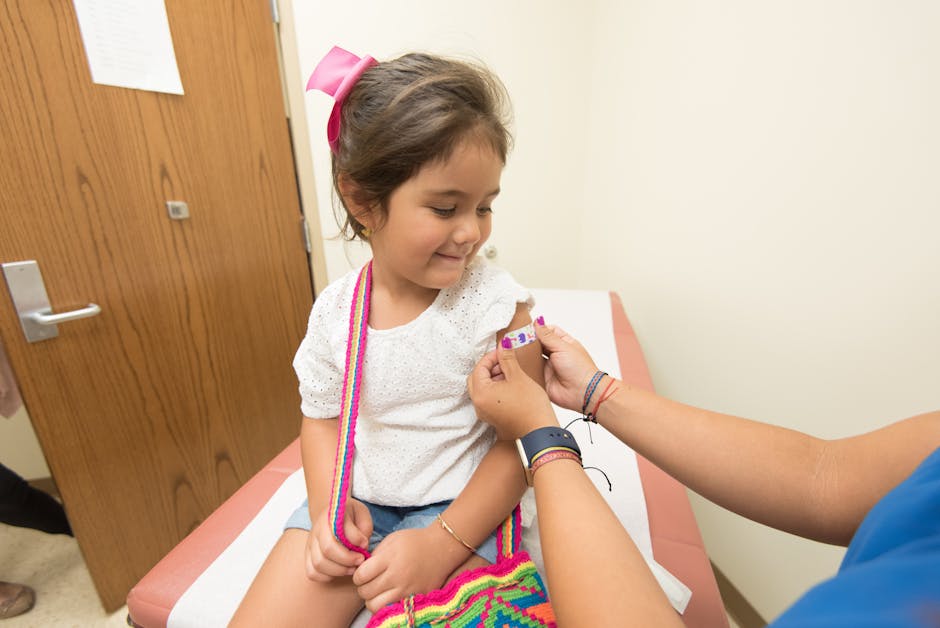
Start with Midjourney (or DALL·E) to generate a high‑resolution background of a friendly pharmacist offering a flu shot. Import the image into DesignLumo, add editable text layers: "Protect Your Family – Flu Shots 2024" in your brand font. Apply a 5‑second fade‑in animation using Adobe Express for story ads. Deploy across Google Display; monitor view‑through rate (VTR). Campaigns using this custom hero see VTR 1.8× higher than generic stock photos, and conversion lifts of 12‑15% on appointment bookings.
Prescription Savings Badge

Create a “Save $20 on First Prescription” badge by typing a prompt into DesignLumo: "round badge, teal background, bold white text, pharmacy icon". The AI returns a layered SVG you can instantly recolor for A/B tests (e.g., teal vs. orange). Insert the badge into all ad creatives using Canva’s drag‑and‑drop for quick mockups, then export the final layered file back to Lumo for precise placement. Track badge click‑through rates; a well‑placed badge typically adds 0.4%‑0.6% CTR and improves CPA by 10% on Facebook ads.
2. Copy‑Driven Performance Layouts
Dynamic Call‑to‑Action Carousel

Use DesignLumo to generate a three‑slide carousel where each slide swaps a single benefit (e.g., "Free Consultation", "24‑hr Refills", "Same‑Day Immunization"). Prompt Lumo for editable headline layers and a consistent background that matches your brand kit. Export PNGs, then upload to Facebook Ads Manager, setting each slide to 5‑second auto‑rotate. Measure slide‑specific CTR; the benefit‑focused carousel typically raises overall ad CTR by 35% versus static single‑image ads, and drives a 22% lift in appointment bookings.
Benefit‑Focused Infographic Slider

Create a 5‑step health‑tip infographic using Canva’s chart library for data points (e.g., "80% of flu patients benefit from early vaccination"). Export each step as a PNG, then import into DesignLumo to add editable call‑outs and brand colors. Assemble the slides in a Google Web Designer responsive ad, setting a 3‑second dwell time. Track scroll‑through rate; campaigns with an educational slider see a 28% higher conversion rate on Google Display because users engage longer with the content.
Urgency Countdown Overlay

In DesignLumo, generate a transparent layer containing a digital clock set to "00:12:00" for a limited‑time offer. Export as a GIF and layer it over any ad creative in Adobe Express, ensuring the countdown syncs across all placements. Deploy on Instagram Stories; the perceived scarcity boosts click‑through by 0.7% and reduces CPA by 13% compared to non‑countdown ads. Record the exact timestamp of ad launch to correlate the countdown’s final minute with a spike in conversions for reporting.
3. Platform‑Specific Optimization
Facebook/Instagram Feed Ad Pack

Generate a set of four aspect‑ratio variants (1:1, 4:5, 9:16, 1.91:1) in DesignLumo by prompting: "pharmacy ad, brand colors, headline placeholder, space for CTA button". Each version retains editable text layers for quick copy swaps. Upload the pack to Meta’s Power Editor, enabling automatic placement optimization. Monitor placement‑level CTR; the 4:5 vertical often outperforms 1:1 by 12% on mobile, while 1.91:1 yields the lowest CPM. Adjust budgets accordingly to maximize ROAS.
Google Display Responsive Ad Set

Use DesignLumo to produce a master design with separate layers for headline, description, and logo. Export as a high‑resolution PNG and a transparent SVG for the logo. In Google Ads, select Responsive Display Ads and upload the assets; the platform automatically recombines them into dozens of ad sizes. Track viewable impression rate (VIR); responsive ads typically achieve a 1.3× higher VIR and a 9% lower CPA versus static image ads, thanks to auto‑optimization across placements.
TikTok Spark Video Thumbnail

Prompt DesignLumo for a bold, text‑heavy thumbnail (e.g., "Flu Shot Deal!") that includes a cut‑out of a smiling pharmacist. Export as a PNG with a transparent background, then import into InShot to add a 0.5‑second animation (zoom‑in). Upload as the cover frame for a 15‑second Spark ad promoting same‑day immunizations. Early data shows thumbnails with a facial element raise video completion rates by 18% and drive a 22% higher swipe‑up conversion compared to generic text‑only covers.
Before you go
- Leverage DesignLumo’s Brand Kit sync to enforce color consistency across every ad variant without manual re‑entry.
- Run a 7‑day micro‑test on each platform using identical copy but different visual layouts to isolate the creative lift.
- Export all assets as layered PSDs from Lumo; keep a master file for rapid iteration when regulations or promotions change.















Ready to create your first design?
Join thousands creating professional designs in seconds.
Create with DesignLumo
Related Resources
Etsy Pharmacy Marketing Toolkit
Actionable tools for Etsy pharmacy shops to boost banners, listings, and promos.
Pharmacy Marketing Mistakes That Cost Sales
Avoid common pharmacy marketing errors and boost prescriptions, OTC sales, and immunizations.
Shopify Pharmacy Content Ideas That Convert
Actionable Shopify design ideas for pharmacies to boost sales.
Valentine's Day Pharmacy Marketing & Design Playbook
Actionable Valentine’s Day tactics for pharmacies to boost sales and patient loyalty.
TikTok Essentials for Pharmacy Marketing
Actionable TikTok tools and workflows that drive foot traffic and prescriptions for pharmacies.
Facebook Toolkit for Pharmacy Marketing
Essential Facebook tools for pharmacy marketers to boost engagement, ads, and branding.