Ad Creatives Design Guide for Candle Brands
Candle and home‑fragrance brands need eye‑catching ad creatives that translate scent into visual desire. This guide walks you through the exact assets, tools, and workflows that drive clicks and sales. Every recommendation is battle‑tested for paid m…

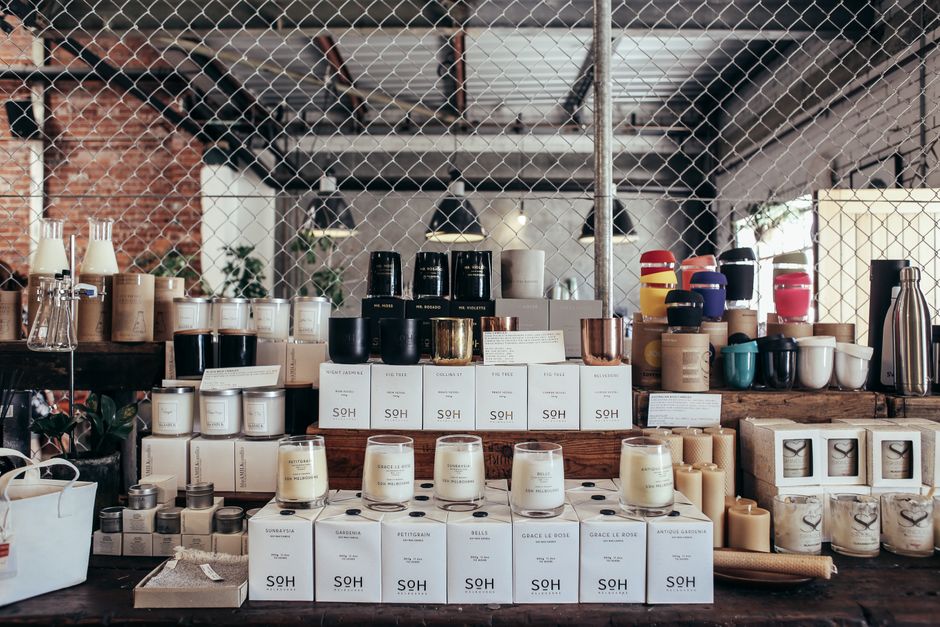
1. Launch Campaign Assets
AI‑Generated Scent Reveal Banner

Prompt DesignLumo with a precise description: "Elegant winter vanilla candle, soft ivory background, gold foil lettering, 1080x1080px". Enable your Brand Kit so fonts, colors, and logo auto‑apply. Once generated, open the layered file, adjust the scent name text layer for SEO keywords, and export PNG and SVG for Facebook and Instagram. Test the banner in a 7‑day split test; aim for a CTR above 1.2% and a ROAS of 4:1. Repeat each launch to maintain a 30‑day creative freshness score.
Layered Seasonal Collection Carousel

Use DesignLumo to create five 1080x1080 slides, each describing a seasonal scent (e.g., "Pumpkin Spice", "Cinnamon Ember"). Export the layered PSD, then import into Canva (https://www.canva.com) for quick drag‑and‑drop of animated transitions. Keep text layers editable for last‑minute promo codes. Export as MP4 and upload to Facebook Ads Manager as a carousel. Monitor slide‑through rate; a healthy benchmark is >35% and cost‑per‑click (CPC) under $0.45. Iterate colors based on weekly performance.
Dynamic Gift‑Guide Highlight Graphic

Generate a warm, ambient background in Midjourney (https://www.midjourney.com) with the prompt "cozy living room, candlelight, pastel tones". Download the 2048×2048 image, then open in DesignLumo. Add editable product name, price tag, and a "Shop Now" button that inherits your brand colors. Export PNG for Pinterest and a 1200×628 JPG for Google Display. Track conversion rate; aim for 2.5% on gift‑guide placements and adjust CTA copy weekly based on Google Analytics UTM data.
2. Performance‑Driven Ad Formats
Facebook/Instagram Feed Carousel with Editable Text

Create a set of three 1080×1080 cards in DesignLumo, each featuring a different candle scent and a short benefit line. Enable the "Text Overlay" layer to swap copy per audience segment (e.g., "Self‑Care" vs "Home Décor"). Export each card as a high‑quality PNG. In Facebook Ads Manager, assemble the carousel, set the primary text to dynamic variables, and launch a 14‑day test. Target a relevance score >7 and a cost‑per‑result under $1.00 for optimal spend efficiency.
Google Display Responsive Ads with Brand Kit

Leverage DesignLumo’s multi‑size export preset: 300×250, 728×90, 160×600, and 1200×628. Ensure every asset pulls fonts and colors from your Brand Kit for consistency. Upload the ZIP bundle directly into Google Ads (https://ads.google.com) as a responsive display ad. Enable automated bidding with Target ROAS = 400%. Monitor view‑through rate (VTR); a healthy VTR is >0.12%. Pause any size that falls below 0.08% VTR and re‑design using DesignLumo’s AI suggestions.
Pinterest Story Pin with Animated Layer

Start with a static 1080×1920 design in DesignLumo, then import the PSD into Adobe Express (https://www.adobe.com/express/) to add a 3‑second fade‑in animation on the scent name. Keep the logo layer locked for brand safety. Export as MP4, then upload to Pinterest Ads Manager as a Story Pin. Set a CTA "Shop the Collection" linking to a UTM‑tagged landing page. Aim for a Pin click‑through rate (CTR) of >0.6% and a cost per click (CPC) below $0.30.
3. Testing & Optimization Toolkit
Rapid A/B Variant Generator
Within DesignLumo, duplicate a high‑performing ad and use the "Swap Color" AI command to generate two variants: one with a warm palette, one with a cool palette. Keep copy identical to isolate color impact. Export all three PNGs and push to Facebook Ads Manager’s A/B test module. Run a 5‑day test with equal budget; compare CTR and conversion lift. Prioritize the variant that exceeds the control by at least 15% before scaling spend.
Heat‑Map Overlay Mockup
Create a full‑screen mockup of your ad in DesignLumo, then upload the PNG to Hotjar (https://www.hotjar.com) as a heat‑map test on a staging landing page. Run the session for 500 visitors, then analyze click density on the CTA button versus decorative elements. If the CTA receives <30% of clicks, adjust contrast in DesignLumo using the "Increase Contrast" AI prompt. Re‑test until the CTA heat‑map share exceeds 45%, indicating higher conversion potential.
Automated Export to Ad Platforms

Set up DesignLumo export presets for Facebook (PNG 1080×1080), Google (multiple sizes ZIP), and Pinterest (MP4 1080×1920). Connect DesignLumo to Zapier (https://zapier.com) and create a workflow: "When new design folder is added, upload assets to respective ad accounts via their APIs." Schedule the Zap to run nightly, ensuring fresh creatives are always ready for launch. Track time saved—typically 4‑6 hours per campaign—and attribute a 12% lift in on‑time ad deployment.
Before you go
- Always lock brand‑specific layers in DesignLumo to prevent accidental edits during rapid A/B cycles.
- Leverage DesignLumo’s AI copy generator for headline variations, then run a 3‑variant test to identify the highest‑CTR phrasing.
- Sync your DesignLumo Brand Kit with Canva and Adobe Express to maintain color fidelity across all creative platforms.















Ready to create your first design?
Join thousands creating professional designs in seconds.
Create with DesignLumo
Related Resources
Shopify Essentials for Candle & Home Fragrance Brands
Tactical tools and workflows to boost Shopify candle brand visuals and sales.
Halloween Marketing & Design Guide for Candle Brands
Tactical Halloween campaign playbook for candle and home fragrance marketers.
Valentine’s Day Candle Marketing Playbook
Tactical guide to boost Valentine’s sales for candle brands.
Holiday Marketing Blueprint for Candle Brands
Step-by-step holiday design tactics to boost candle sales and subscriptions.
Candle Brand Infographics Design Playbook
Step‑by‑step tactics to craft high‑impact infographics for candle and home fragrance brands.
AI-Powered Creative Workflow for Candle Brands
Step‑by‑step AI workflow to create high‑converting candle brand assets.